DRG Clinic

℞ OPD, Tokens & Prescriptions

Token queue with waiting-room display, patient link, consultation screen with templates and assistant, printed prescription with QR code.

Try it free Sample reports

OPD, Tokens & Prescriptions screen in DRG Clinic

What you can do

OPD queue

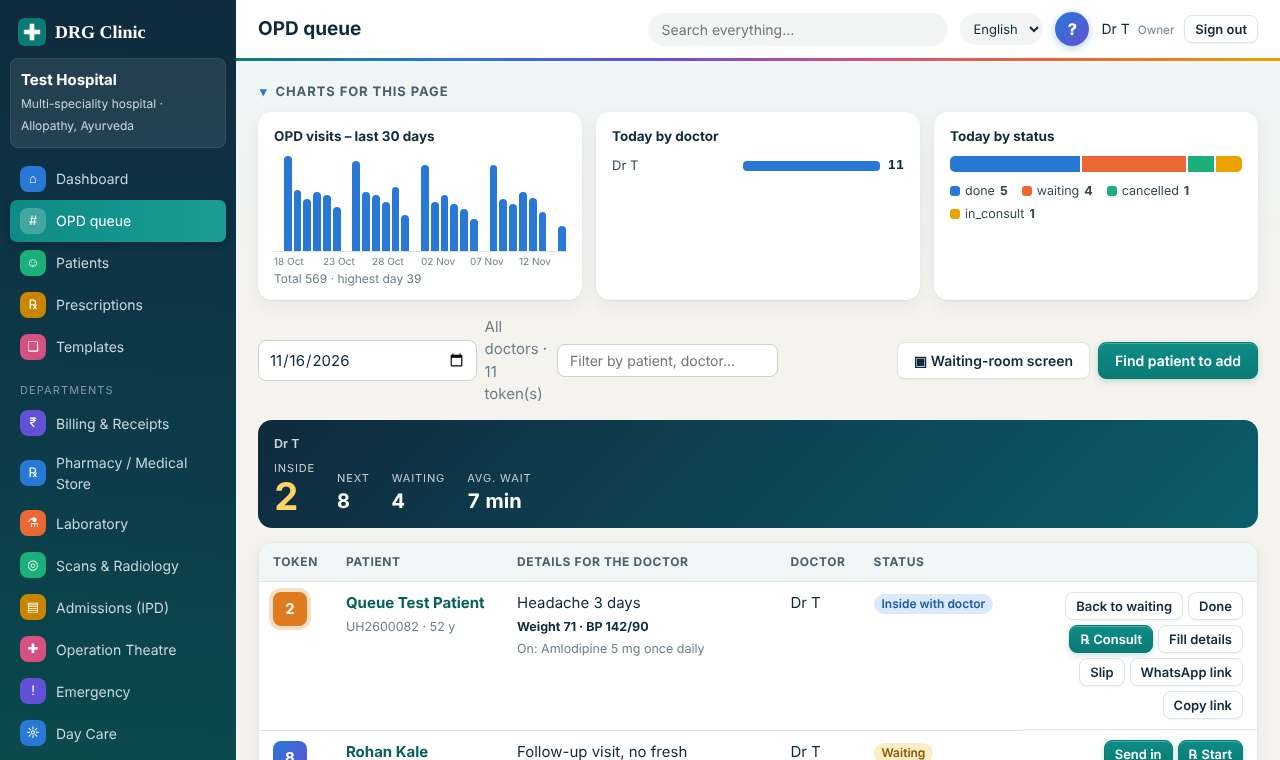
Today’s OPD tokens for each doctor: who is inside, who is next, and what is still to be collected.

  • The dark cards on top show, per doctor, the token inside, the next token, how many are waiting and the average wait today.
  • “Send in” calls a waiting patient; only one patient can be inside with a doctor at a time. “Back to waiting” and “Cancel” undo it.
  • “Fill details” records weight, BP, symptoms, history and current medicines so the doctor sees them before the patient walks in.
  • “WhatsApp link” opens WhatsApp with a message for the patient. From that link the patient can follow the queue, fill their own details and later see the prescription.
  • “Slip” prints a token slip with a QR code of the same link.
  • After the doctor completes the visit, “Collect ₹…” raises the bill for the consultation and any medicines the doctor gave.

Patients

The list of everyone registered at your hospital.

  • Search by name, mobile number, UHID or Health ID.
  • Click a name to open the patient file with history, bills and reports.
  • “New patient” registers someone; only the name is compulsory.
  • The charts show new registrations, age groups and sex of your patients.

Consultation

The consultation screen: everything from reception on top, your prescription in the middle, private notes and charges at the bottom.

  • The orange box shows what reception or the patient filled in. Vitals, history and current medicines are copied into the form for you to correct.
  • Type the illness in the quick box: matching templates appear as you type; click one to fill the form, then edit anything.
  • “Draft from my notes” asks the assistant for a draft using what you typed plus your notes, the history and current medicines. Always review it.
  • “Medicines prepared or given by the doctor” is for your own mixtures and dispensed stock: write the ingredients and the charge.
  • No medicines? Write a treatment or therapy plan instead – the visit can be saved with a plan alone.
  • Private notes stay on your record. Tick the boxes to share them, or to leave findings and diagnosis off the patient’s copy.

Prescriptions

Every prescription written at your hospital, newest first.

  • Search by patient, code, diagnosis, medicine or doctor.
  • Cancelled prescriptions stay in the list, struck out.
  • Open one to print it, share its link, dispense it in the pharmacy, amend or cancel it.

Templates

Prescription templates: built-in starters and your own.

  • Built-in templates cannot be changed; use “Copy & customise” to make your version.
  • Your own templates appear first when writing a prescription.
Who can open it

Owner · Administrator · Doctor · Receptionist · Nurse

Also included

Search, CSV export, charts above the list, help on every page, activity log, 4 languages.

Other departments

See it working with sample data.

Register your clinic